Syllabus
Course Overview
| Topic | Info |
|---|---|
| Course | COP 3402 - Systems Software |
| School | University of Central Florida |
| Semester | Fall 2026 |
| Section | 001 |
| Prerequisites | See below |
| Lectures | Tuesdays and Thursdays 12:00 PM - 1:15 PM |
| Location | BA1 O119 |
| Final | Thursday, December 10, 2026 10:00 AM – 12:50 PM (link) |
| Instructor | Brent Pappas brent.pappas@ucf.edu |
| TA(s) | Sanan Hasanov |
Prerequisites
- Complete each of the following:
- Earn a C in CDA3103C - Computer Logic and Organization.
- Earn a C in COP3502C - Computer Science I.
Office Hours
| Person | Dates | Weekdays | Time | Location |
|---|---|---|---|---|
| Sanan | 08/31 - 12/09 | M W F | 12:30 PM - 2:30 PM | HEC 249 |
| Brent | 09/01 - 12/08 | Tu Th | 11:15 PM - 12:00 PM | HS2 244 |
| Brent | 09/01 - 12/10 | Tu Th | 1:15 PM - 2:00 PM | HS2 244 |
Labs
| Person | Dates | Day and time | Location |
|---|---|---|---|
| Sanan | 09/04 - 12/04 | Fridays, 9:30 AM - 10:20 AM | CB1 O103 |
| Sanan | 09/04 - 12/04 | Fridays, 10:30 AM - 11:20 AM | CB1 O103 |
| Sanan | 09/04 - 12/04 | Fridays, 11:30 AM - 12:20 PM | CB1 O103 |
Description
This course overviews the use and creation of systems software. In the first half of the course, students will learn how to interact with systems software on the Linux command line, and the basic principles behind systems software. This includes concepts such as hierarchical file systems, file tables and descriptors, system calls, process creation and management, and inter-process communication (e.g., redirection and pipes). Students will then apply these principles while using common software development tools such Git, Make, Vim, and Emacs to create their own system software in C.
In the second half of the course, students will use the ANTLR parser generator and C++ to create a compiler for a toy language. Students will learn and apply the basics of lexing and parsing to convert source code into an abstract syntax tree (AST). They will then use the visitor design pattern to define how to translate different nodes in an AST (e.g., arithmetic, branching constructs, function calls) into x86 assembly code.
Learning Outcomes
By the end of the first half of this course, students will be able to:
- Navigate and manipulate a file system hierarchy on the Linux command
line with commands such as
cd,touch,cp, andmv. - Create a Git repository, stage and commit code changes to it, and finally push its committed changes to a remote server.
- Automate common steps for building systems software (e.g., compiling and linking) with the Make build system.
- Re-implement basic command line tools such as
findandwcby using system calls likeopen()andread(), working directly with file descriptors in C. - Implement a shell in C that parses and interprets its input, with
support for redirection, piping, and command execution by way of system
calls such as
fork(),wait(),dup2(), andexec().
By the end of the second half of this course, students will be able to:
- Define a programming language’s grammar in terms of terminal and non-terminal symbols, and use the ANTLR parser generator to generate a top-down recursive descent parser for such a grammar.
- Use the visitor pattern to translate an ANTLR-generated abstract syntax tree into x86 assembly code. Specifically, students will be able to translate the following programming language constructs into assembly: arithmetic operations, variable and function declarations and references, pointer declarations and dereferences, and control flow constructs.
- Create, add to, and access a symbol table for translating variable, parameter, and function calls to assembly code.
- Follow a system’s Application Binary Interface to translate function calls in a high level language to assembly code that correctly sets up a function call’s stack frame, allocates spaces for function parameters and local variables, executes the function, then finally tears down the function’s stack changes to restore control to the function’s caller.
Schedule
| # | Date | Topic | Video | Board | Reading | HW | Exercise | Project | Due |
|---|---|---|---|---|---|---|---|---|---|
| 01 | 08/25 | Introduction | Video | Board | Eustis, then Vim or Emacs | hw1 | |||
| 02 | 08/27 | The command line | Video | Board | LPI sec 1.1–1.2, 2.1–2.7 | hw2 | |||
| 03 | 09/01 | Version control | Video | Board | 21st ch 4 | hw3 | vc | ||
| 04 | 09/03 | Build automation | Video | Board | 21st ch 3 | hw4 | hello | ||
| 05 | 09/08 | File basics | Video | Board | Unix sec 1–9 | hw5 | |||
| 06 | 09/10 | System calls | Video | Board | LPI sec 3.1–3.4, 4.1–4.9 | hw6 | vc | ||
| 07 | 09/15 | System calls | LPI sec 18.1–18.4 | ||||||
| 08 | 09/17 | Process basics | LPI sec 6.1–6.6 | myfind | hello | ||||
| 09 | 09/22 | Process basics | LPI sec 24.1–24.2 | ||||||
| 10 | 09/24 | Process creation | LPI sec 27.1–27.4 | ||||||
| 11 | 09/29 | Redirection | LPI sec 5.1–5.5 | ||||||
| 12 | 10/01 | Pipes | LPI sec 44.1–44.4 | ||||||
| 13 | 10/06 | Shells | 21st ch 2 | proc | |||||
| 14 | 10/08 | Midterm review | myfind | ||||||
| 15 | 10/13 | Midterm | |||||||
| 16 | 10/15 | Source to process | slang-format | ||||||
| 17 | 10/20 | Compiler basics | |||||||
| 18 | 10/22 | Compiler basics | slang-format | ||||||
| 19 | 10/27 | Compiler project | codegen1 | proc | |||||
| 20 | 10/29 | Arithmetic | |||||||
| 21 | 11/03 | Branching | |||||||
| 22 | 11/05 | Pointers | codegen2 | ||||||
| 23 | 11/10 | Pointers | |||||||
| 24 | 11/12 | Functions | codegen3 | codegen1 | |||||
| 25 | 11/17 | Functions | |||||||
| 26 | 11/19 | Project review | codegen2 | ||||||
| 27 | 11/24 | Stack smashing | |||||||
| 11/26 | Thanksgiving Break - no lecture | ||||||||
| 28 | 12/01 | Final review | codegen3 | ||||||
| 29 | 12/09 | Final | |||||||
| 12/12 | Project regrade request deadline |
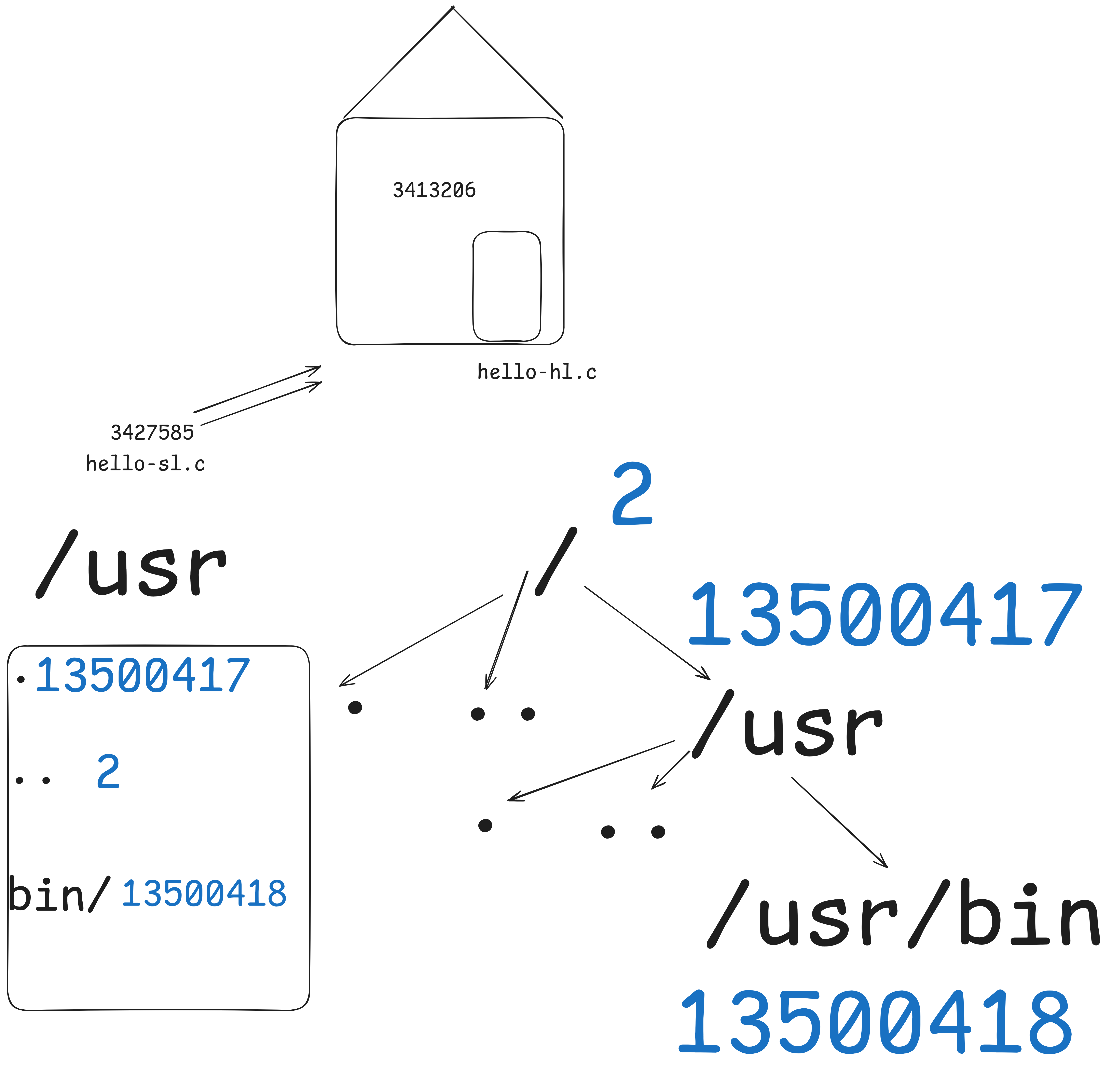
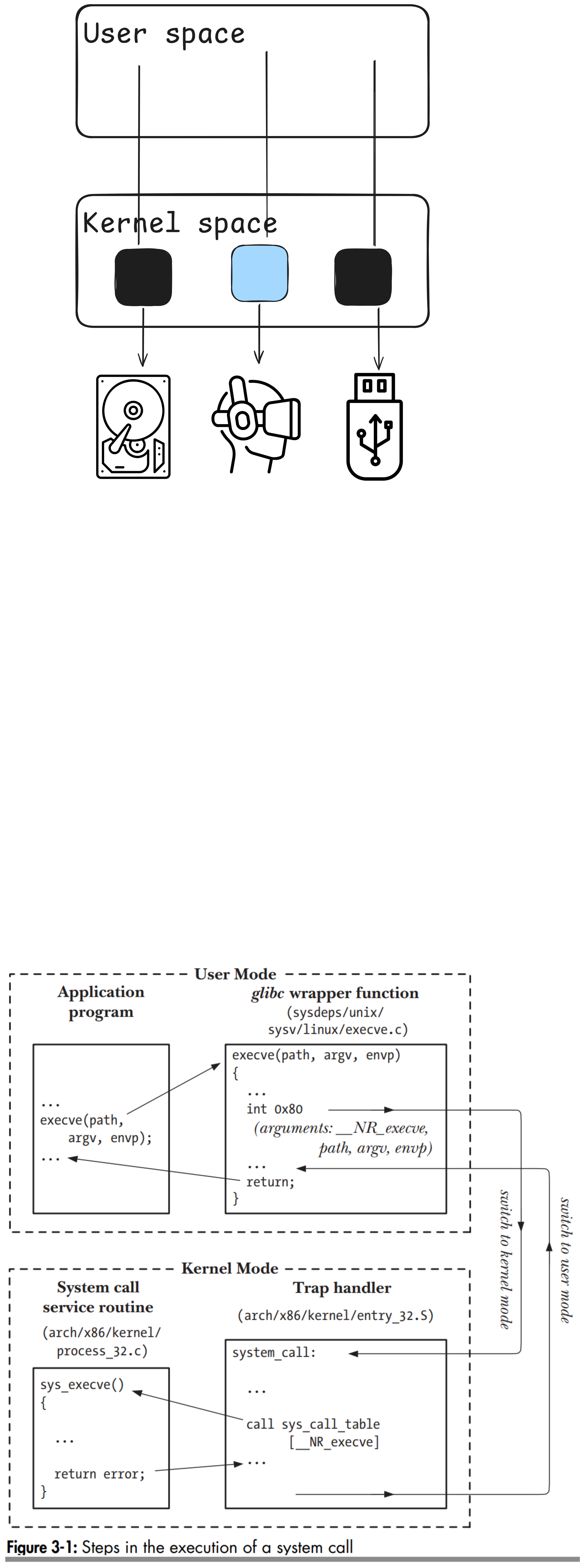
Grading
Assignments
| Category | Points per Assignment | Quantity | Total |
|---|---|---|---|
| Attendance | 4 | N/A | 4 |
| Exercises | 4 | 2 | 8 |
| Midterm Exam | 8 | 1 | 8 |
| Final Exam | 12 | 1 | 12 |
| Homework | 1 | 20 | 20 |
| Projects | 8 | 6 | 48 |
| Total | 100 |
All assignments are individual assignments and should be completed alone.
Late Policy
| Category | Unexcused Late Policy |
|---|---|
| Homework | No late homework or regrade requests for homework |
| Exercises | Can request a regrade only up to two lecture days late, with a 1 point deduction |
| Projects | Can request a regrade until the final project regrade request deadline, with 1 point deduction from each submission |
Excused late submissions are accepted per UCF policies on excused absences and missed coursework. Please see the syllabus section on excused absences.
Homework
- Submitted via Webcourses.
- Due the minute before the following lecture.
- If an exam or exam review is the next class, then the due date is the following regular lecture.
- Graded for genuine effort and responsiveness, not 100% accuracy.
- Homework answers are reviewed in the following lecture, so late homework receives zero points.
- 20 out of all homework assignments count. The rest are dropped.
Exercises
- Submitted via git on eustis.
- Due on the date in the schedule by the end of day local time, i.e., 11:59 PM.
- Exercises are simple tasks that reinforce core competencies while also providing a platform for learning new tools.
- Because exercises focus on core concepts, they can only be resubmitted up to two lecture days late.
- Two lecture days typically means one week, since there are two lectures per week and all assignments are due on lecture days.
- When a following lecture day is a break, skip to the next lecture day to continuing counting.
Projects
Submitted via git on eustis.
Due on the date in the schedule by the end of day local time, i.e., 11:59 PM.
Some projects may include optional features that students can implement for extra credit.
- proc and myfind each provide 2 bonus points for completing bonus features.
- Test cases for bonus features are never released, and students are expected to develop and test them on their own.
Projects can be submitted or resubmitted any time up until the final project regrade request deadline (listed on the syllabus schedule) for a one-time late penalty of 1 point.
- Examples:
- A student submits the myfind project by the due date. The projects receives only 2/8 points. The student resubmits a fully-working project after the due date and gets 7/8 points, full credit minus the 1 point late penalty.
- A student submits a fully-working myfind project by the due date and gets 8/8 points with no late penalty.
- A student forgets to submit the myfind project by the due date and receives zero points. To repair their grade, the student completes the myfind project and all its bonus features, uploads their code, and submits a regrade request. All test cases pass, and the student receives 9/8 points: full credit (8/8) minus the 1 point late penalty (7/8), plus the 2 bonus points for completing the bonus features (9/8).
- Examples:
To request a resubmission, first upload your code changes to the grading server with git, then send an email requesting a regrade to Marco Morris (email: ma781030@ucf.edu), the course grader responsible for regrading project submissions. When sending this email, please use the following template, replacing the values in angle brackets (
<>) with your information:Subject: COP 3402 Regrade Request Hi Marco, May I please have a regrade for <PROJECT> for COP 3402? My NID is <YOUR_NID>. Thank you! <YOUR_NAME>Please wait at least a week before asking for updates on regrade requests.
Projects are graded with automatic testing, and only half of these tests (specifically, the odd-numbered ones) will be released. The other half will be described in writing, enabling you to write your own test cases for these tests. Do not share such test cases with others.
Frequently-asked Project Questions (Read Before Emailing Me)
Please read the following brief list of frequently-asked questions before emailing me project-related questions. If this section does not answer your question, then please inform me of your project-related issue via email. If I discover that your issue could have been resolved by simply reading this FAQ, then I will reply to you with a link to this section and instructions to read it. Please be polite when emailing me.
- Question: My code passes all public test cases, implying that I
should receive at least half credit for the project since half of all
test cases are made public, yet I received less than half credit on the
project; why is this?
- Answer: There are two likely causes for this:
The code pushed to your remote repository does not match the code in your local repository. Please review the version control exercise for steps to synchronize a local git repository with a remote git repository.
Your remote repository contains compiled program binaries, such as executable files or
.ofiles. Not only is pushing such generated files a bad practice, it can also lead to an out-of-date program binary being tested by the automatic grading scripts, instead of a freshly compiled binary reflecting your source code’s behavior.For instance, let’s imagine you were to push your
myshexecutable to your remote repository for the proc project. To test your project, the automatic grading script would first clone it, then runmaketo build themyshtarget. However, since your repository alrady contains a file calledmysh,makewill not perform any actions, assuming the file is up-to-date. The grading script will then proceed to test your pushedmsyhexecutable, instead of themyshexecutable resulting from compiling your pushed source code.To fix this problem, first remove any executable files and
.ofiles from your repo withrm, and then stage, commit, and push your updated code. If you would like help with this, please ask, or better yet come visit me during office hours.
- Answer: There are two likely causes for this:
- Question: I’ve pushed my code to my remote repository, but why is it
not there when I run
git cloneto perform the self-check?Answer: You may have accidentally created a git repo in your home directory, or in your
~/cop3402fal2026directory. To check if this is your issue, run:ls -d ~/.git 2>/dev/null ls -d ~/cop3402fal2026/.git 2>/dev/nullIf either of the above commands printed the path to a
.gitdirectory, then run these commands to delete it:rm -fr ~/.git rm -fr ~/cop3402fal2026/.gitNow navigate back into your project directory with
cd, and try again to stage, commit, and push your code. Please review the version control exercise for steps to synchronize a local git repository with a remote git repository.
Exams
- Both exams (midterm and final) are taken in-person.
- Taken via Webcourses or on paper per the student’s choice.
- Cover material from homework, projects, and lectures.
- The final is cumulative, with about 25% of the exam consisting of material from the first half of the semester and the remaining 75% consisting of material from the second half.
- In-class reviews will be held the lecture before the exam.
- Eight double-sided pages (16 total sides, 8 total pages) of reasonably-sized notes are permitted for the midterm, and 12 for the final.
- The midterm will be held on a regularly-scheduled lecture day.
- The final will be held during finals week.
Attendance
- Taken with UCF Here. UCF Here is a digital method of taking attendance. A QR code will be displayed in front of the class, and students must scan this with code to be marked as present.
- A physical attendance sheet will be provided for students who cannot scan the UCF Here QR code.
- 2 bonus points are awarded for attending at least 75% of all
lectures.
- e.g., if a student only were to attend 75% of all lectures, then they would initially receive 3/4 points for attendance, and then 2 more bonus points, for a total of 5/4 points.
- When possible, students must notify the instructor in advance for excused absences.
Letter Grades
| Letter | Point Threshold |
|---|---|
| A | >= 90 |
| B | >= 80 |
| C | >= 70 |
| D | >= 60 |
| F | < 60 |
Requirements
Hardware
All students will need access to a computer that can connect to UCF’s eustis server to complete course assignments.
Inexpensive laptops (less than $100) can run a Linux-based OS efficiently. Chromebooks are often very cheap and can use the Chrome Secure Shell Extension to connect to eustis.
Textbooks
| Book | Abbreviation | Link | Chapters to Download |
|---|---|---|---|
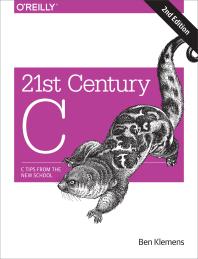 |
21C | Link | Preface, 1, 2, 3, 4, 5 |
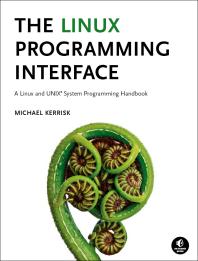 |
LPI | Link | 1, 2, 3, 4, 5, 6, 18, 24, 25, 26, 27, 44 |
Textbook Download Instructions
The digital versions of the course textbooks are available for free through the UCF Libraries. Accessing the textbook requires that you authenticate (log in) with your NID. You are permitted to read the textbook online and/or download content to read offline. If PDF downloads are available for your book, this method is recommended to ensure uninterrupted access to the content. Any unauthorized sharing of the textbook content is in violation of the license agreement between the publisher and university. The license permits access to this textbook for current UCF students, staff, and faculty only. Contact your librarian if you have any questions.
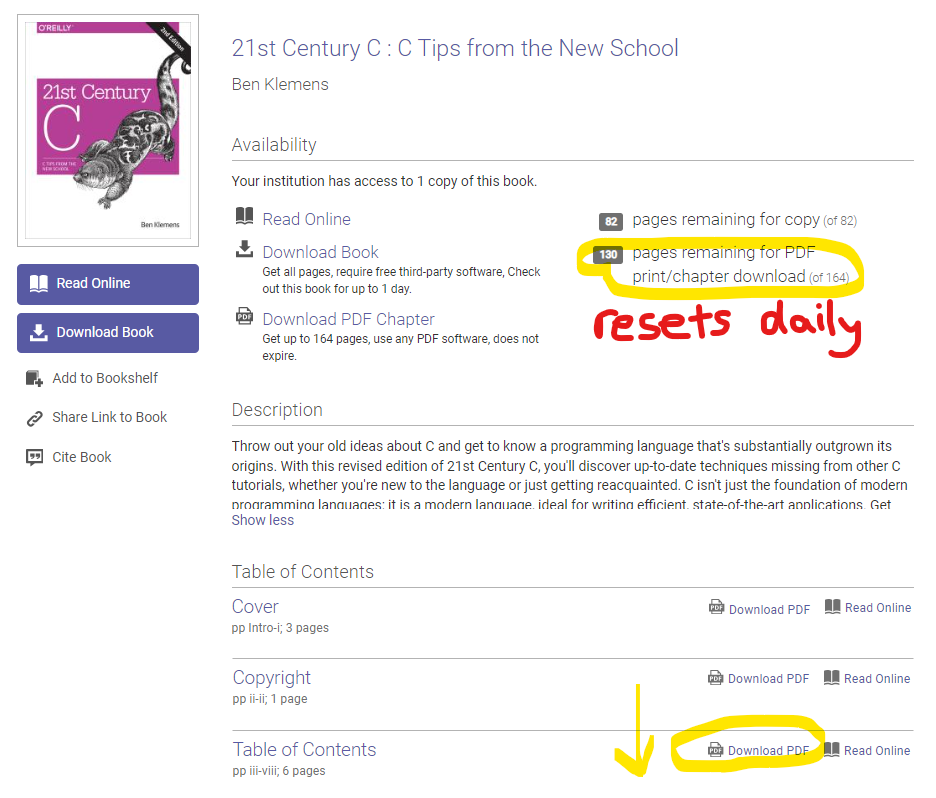
Notice in the first circle that it tells you how many PDF pages can be downloaded per day. It starts at 164 per day, then resets after 24 hours.
Scroll down and see the next circled area. This is where you find the Download PDF links. Do those. Do not do the “Read Online” or “Download Book” options on the left (as these options prevent other students from using the eBook).
Thanks to Lily Dubach for getting students book access and providing the instructions above.
Core Policy Statements
Unauthorized Assistance with Coursework
Receiving a work product (e.g., a homework paper or code submitted in response to an assignment) from other individuals (other students in the course, former students, tutors, etc.) is considered “Unauthorized assistance”. Giving such a work product to other individuals, either willfully or through negligence, is considered “Helping another violate academic behavior standards.” Copying a work product from submissions from past semesters, or copying from an online repository is considered “Plagiarism.” You are allowed to discuss class materials and high level concepts related to the assignment with others. However, you must work individually when creating the work product. For programming assignments, you must design algorithms, data structures, and develop code individually. Any violation to the above is considered Academic Integrity Violation. Students found to be in violation of academic integrity will be reported to the Office of Integrity and Ethical Development, in addition to receiving a zero grade on their assignments. Following the report, The Office may conduct hearing, and if found in violation, a student may receive penalties, up to and including dismissal from the university. Unless stated explicitly as team/group assignments, students should assume that assignments are to be performed individually, or ask the instructor for explicit clarification.
Excused Absences
Make-up Assignments for Health Issues
A student who is suffering health issues preventing them from attending lecture or completing course assignments on-time may submit requests for excused absences, make-up exams, and deadline extensions. In all cases, the student must provide a note signed by a medical professional. Additional verification may be requested for students who repeatedly request excused absences for medical reasons.
Make-up Assignments for Authorized University Event or Co-curricular Activities
Students who represent the university at an authorized event or activity (for example, student athletes) and who are unable to meet a course deadline due to a conflict with that event must provide the instructor with documentation in advance to arrange a make-up. No penalty will be applied if the student gives advance notice and communicates with the instructor following UCF policy. In the case of an authorized university activity, it is your responsibility to show the instructor a signed copy of the Program Verification Form for which you will be absent, prior to the class in which the absence occurs or due date you need extended. For more information, see UCF Policy 4-401.
Make-up Assignments for Religious Observances
A student who desires to observe a religious holy day of his or her religious faith must notify their instructor as soon as practicable prior to the observance. Students who are absent because of religious observances will be permitted a reasonable amount of time to complete any missed work. For more information, see UCF Regulation 5-020.
Academic Integrity
The Center for Academic Integrity (CAI) defines academic integrity as a commitment, even in the face of adversity, to five fundamental values: honesty, trust, fairness, respect, and responsibility. From these values flow principles of behavior that enable academic communities to translate ideals into action. http://academicintegrity.org/
The UCF Creed: Integrity, scholarship, community, creativity, and excellence are the core values that guide our conduct, performance, and decisions.
- Integrity: I will practice and defend academic and personal honesty.
- Scholarship: I will cherish and honor learning as a fundamental purpose of my membership in the UCF community.
- Community: I will promote an open and supportive campus environment by respecting the rights and contributions of every individual.
- Creativity: I will use my talents to enrich the human experience.
- Excellence: I will strive toward the highest standards of performance in any endeavor I undertake. The following definitions of plagiarism and misuse of sources come from the Council of Writing Program Administrators http://wpacouncil.org/node/9 and have been adopted by UCF’s Department of Writing & Rhetoric.
Plagiarism
In an instructional setting, plagiarism occurs when a writer deliberately uses someone else’s language, ideas, or other original (not common-knowledge) material without acknowledging its source. This definition applies to texts published in print or on-line, to manuscripts, and to the work of other student writers.
Misuse of Sources
A student who attempts (even if clumsily) to identify and credit his or her source, but who misuses a specific citation format or incorrectly uses quotation marks or other forms of identifying material taken from other sources, has not plagiarized. Instead, such a student should be considered to have failed to cite and document sources appropriately.
Responses to Academic Dishonesty, Plagiarism, or Cheating
UCF faculty members have a responsibility for your education and the value of a UCF degree, and so seek to prevent unethical behavior and when necessary respond to infringements of academic integrity. Penalties can include a failing grade in an assignment or in the course, suspension or expulsion from the university, and/or a “Z Designation” on a student’s official transcript indicating academic dishonesty, where the final grade for this course will be preceded by the letter Z. For more information about the Z Designation, see http://goldenrule.sdes.ucf.edu/zgrade.
For more information about UCF’s Rules of Conduct, see http://www.osc.sdes.ucf.edu/.
Unauthorized Use of Class Materials
There are many fraudulent websites claiming to offer study aids to students but are actually cheat sites. They encourage students to upload course materials, such as test questions, individual assignments, and examples of graded material. Such materials are the intellectual property of instructors, the university, or publishers and may not be distributed without prior authorization. Students who engage in such activity are in violation of academic conduct standards and may face penalties.
Unauthorized Use of Class Notes
Faculty have reported errors in class notes being sold by third parties, and the errors may be contributing to higher failure rates in some classes. The following is a statement appropriate for distribution to your classes or for inclusion on your syllabus:
Third parties may be selling class notes from this class without my authorization. Please be aware that such class materials may contain errors, which could affect your performance or grade. Use these materials at your own risk.
In-Class Recording Policy
Outside of the notetaking and recording services offered by Student Accessibility Services, the creation of an audio or video recording of all or part of a class for personal use is allowed only with the advance and explicit written consent of the instructor. Such recordings are only acceptable in the context of personal, private studying and notetaking and are not authorized to be shared with anyone without the separate written approval of the instructor.
Artificial Intelligence (AI) Use Policy
Students are strongly discouraged from using AI tools to help complete the homeworks, exercises, and projects. This is to help ensure that students better learn the course material. Moreover, the use of AI tools during the midterm and final exams is strictly prohibited.
Course Accessibility Statement
The University of Central Florida is committed to providing access and inclusion for all persons with disabilities. This syllabus is available in alternate formats upon request. Students with disabilities who need specific access in this course, such as accommodations, should contact the professor as soon as possible to discuss various access options. Students should also connect with Student Accessibility Services (Ferrell Commons, 7F, Room 185, sas@ucf.edu, phone (407) 823-2371). Through Student Accessibility Services, a Course Accessibility Letter may be created and sent to professors, which informs faculty of potential access and accommodations that might be reasonable.
Campus Safety Statement
Emergencies on campus are rare, but if one should arise in our class, we will all need to work together. Everyone should be aware of the surroundings and familiar with some basic safety and security concepts.
In case of an emergency, dial 911 for assistance. Every UCF classroom contains an emergency procedure guide posted on a wall near the door. Please make a note of the guide’s physical location and consider reviewing the online version at http://emergency.ucf.edu/emergency_guide.html. Familiarize yourself with evacuation routes from each of your classrooms and have a plan for finding safety in case of an emergency. (Insert class-specific details if appropriate) If there is a medical emergency during class, we may need to access a first aid kit or AED (Automated External Defibrillator). To learn where those items are located in this building, see http://www.ehs.ucf.edu/AEDlocations-UCF (click on link from menu on left). (insert class specific information if appropriate) To stay informed about emergency situations, sign up to receive UCF text alerts by going to my.ucf.edu and logging in. Click on “Student Self Service” located on the left side of the screen in the tool bar, scroll down to the blue “Personal Information” heading on your Student Center screen, click on “UCF Alert”, fill out the information, including your e-mail address, cell phone number, and cell phone provider, click “Apply” to save the changes, and then click “OK.” If you have a special need related to emergency situations, please speak with me during office hours. Consider viewing this video about how to manage an active shooter situation on campus or elsewhere.
Deployed Active Duty Military Students
If you are a deployed active duty military student and feel that you may need a special accommodation due to that unique status, please contact your instructor to discuss your circumstances.