Compiler Project
Compiler overview
Source to process
- Recall how source code becomes a process
- Our project will be on the compiler part
- Translate source to machine code
Compiler input and output
(Diagram)
Input language (Slang) -> Compiler (CodeGen) -> Output language (x86 assembly)
Example run of the compiler
x = x + 2# Load x and 2
mov -16(%rbp), %rax
mov $2, %rbx
# Perform addition, i.e., rax = rax + rbx
add %rbx, %rax
# Store result in x
mov %rax, -16(%rbp)Slang
Our intermediate representation.
Example: C program
int main(int argc, char **argv) {
  int x;
  int retval;
  x = read_int();
  x *= 2;
  retval = print_int(x);
  return 0;
}
Example: Slang
begin main(argc, argv)
locals x, retval
x = read_int()
x = x * 2
retval = print_int(x)
return 0
end
Compilation units
- One file is one compilation
- One compilation unit defines one function
Minimum Slang
begin main()
return 0
endbegin,return, andendmust appear in each Slang program- Function must have a name
- Return takes an integer literal or a variable name
Defines a new function called main.
With parameters
begin main(argc, argv)
locals x, y
# Instructions go here
return 0
endlocalsdeclares all local variables- Parameters are in parentheses after function name
- Locals and parameters must all be unique
For instance, in C, parameters to the function are local variables. In Slang you need to declare all local variables first, include all parameters. Then specify separately which local variables are the parameters.
Statements
Assignment
x = 2
y = x- Sets the value of a variable to
- Use the
=symbol - Assignment to either
- an integer literal or
- another variable name
Arithmetic
x = x + 2- A single operation, no arithmetic expressions
- Always assigns the result to a variable name
Function calls
x = print_int(x)- Works like a C function call
- List arguments after the function name, in parentheses
Branching
if x > 0 goto endlabel
x = x * -1
endlabel:- No structured code, more like assembly
gotofor unconditional branches,iffor conditional- Define labels as targets of branching
Pointers
t1 = &x
t2 = *t1
*t1 = 11- Ampersand gets address
t2 = *t1dereferencest1and gets its value*t1 = t2dereferencest1and assigns its value
Example program: exponents
begin exponent(base, exp)
locals result
result = 1
top:
if exp <= 0 goto endlabel
result = result * base
exp = exp - 1
goto top
endlabel:
return result
end
Slang Grammar
program     =   function
function    =   'begin' identifier parameters newlines [ locals ] body 'end' newlines
ident       =   ?a-zA-Z_?{ ?a-zA-Z1-9_? }
parameters  =   '(' [ identifiers ] ')'
identifiers =   identifier { ',' identifier }
locals      =   'locals' identifiers newlines
body        =   { statement newlines } return newlines
return      =   'return' value
newlines    =   '\n' { '\n' }

statement   =   assignment
                | arithmetic
                | call
                | label
                | goto
                | if
                | reference
                | assignment_dereference
                | dereference_assignment
assignment  =   identifier '=' value
value       =   identifier | integer
identifier  =   ? An alphanumeric sequence possibly containing '_' and not
                  starting with a number ?
integer     =   ? A sequence of integers not starting with zero ?
arithmetic  =   identifier '=' value arithop value
arithop     =   '+' | '-' | '*' | '/' | '%'
call        =   identifier '=' identifier '(' arguments ')'
arguments   =   [ argument { ',' argument } ]
argument    =   value
label       =   identifier ':'
goto        =   'goto' identifier
if          =   'if' value relational_operator value 'goto' identifier

relational_operator     =   '<' | '>' | '=' | '<=' | '>=' | '!='
reference               =   identifier '=' '&' identifier
assignment_dereference  =   identifier '=' '*' identifier
dereference_assignment  =   '*' identifier '=' value
Implementation
Semantic actions
- Recall how we define
compilers/interpreters
- Define the grammar
- Define semantic actions for each construct
ANTLR
- Parsing framework
- Define grammar
- Write semantic actions
Listener model
- Read the ANTLR book
- Examples
Use some Slang, e.g., assignment
Show syntax tree
Show translation specification
Finally show actual C++ code
Intel x86-64 assembly
Memory layout
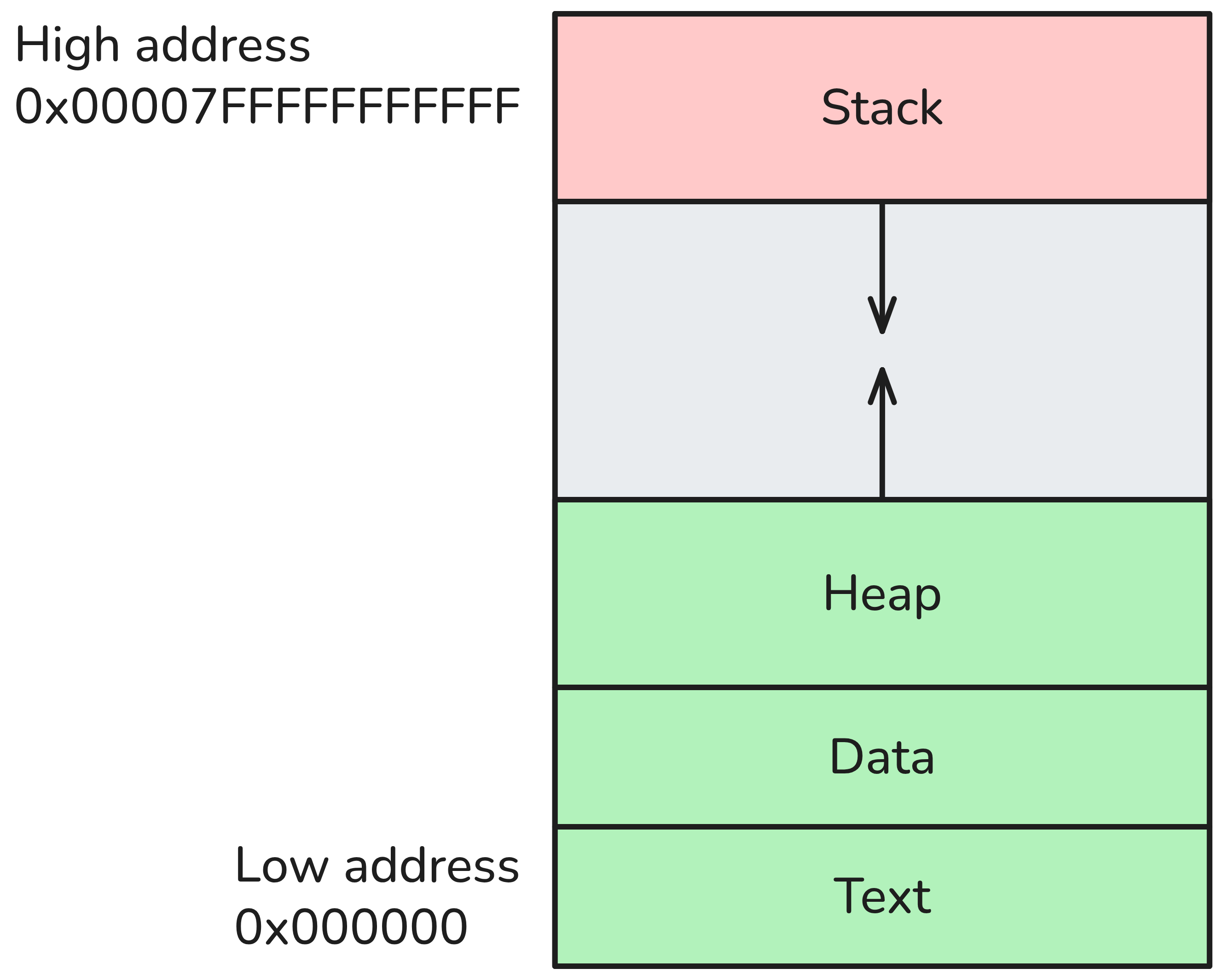
wiki.osdev.html/File:Elfdiagram.png

Note that the heap and stack and created at runtime by the OS
https://wiki.osdev.html/ELF#Loading_ELF_Binaries https://stackoverflow.com/questions/9226088/how-are-the-different-segments-like-heap-stack-text-related-to-the-physical-me
Assembly file layout
- data
- Fixed size, global data section (bss section is zeroed out)
- rodata
- Immutable data, e.g., for string constants
- text
- Executable part
- Assembly file converted to an exectuable
- Loader copies executable segments into memory
x86 registers
| Register name | Description |
|---|---|
%rax |
General-purpose (A for accumulator) |
%rbx |
General-purpose (B for base) |
%rdx |
General-purpose (D for data) |
| ————— | —————————————— |
%rsp |
Stack pointer (SP), top of stack |
| ————— | —————————————— |
%rbp |
Base pointer (BP), local variable access |
| ————— | —————————————— |
https://wiki.osdev.org/CPU_Registers_x86
These are the only registers we’ll need to know about for this class.
%rax is AT&T syntax, which is the default syntax
used by gcc.
x86 operations
Variables, constants, pointers
| Operation | Description |
|---|---|
mov |
Move data to/from registers and memory |
Arithmetic
| Operation | Description |
|---|---|
add |
Integer addition |
sub |
Integer subtraction |
imul |
Integer multiplication |
idiv |
Integer division |
cqo |
Convert quad-word to octo-word (for division) |
Control-flow
| Operation | Description |
|---|---|
jmp |
Jump to a given instruction address |
cmp |
Compare (used for conditional jumps) |
je |
Jump if cmp was equal |
jne |
Jump if cmp was not equal |
jl |
Jump if cmp was less than |
jle |
Jump if cmp was less than or equal |
jg |
Jump if cmp was greater than |
jge |
Jump if cmp was greater than or equal |
Functions
| Operation | Description |
|---|---|
push |
Push onto the stack |
pop |
Pop from the stack |
call |
Push the return address and jump (for functions) |
ret |
Pop the return address and jump to it (for functions) |
Summary
| Use | Operation | Description |
|---|---|---|
| Variables | mov |
Move data to/from registers and memory |
| ————— | ———– | ——————————————————- |
| Arithmetic | add |
Integer addition |
sub |
Integer subtraction | |
imul |
Integer multiplication | |
idiv |
Integer division | |
cqo |
Convert quad-word to octo-word (for division) | |
| ————— | ———– | ——————————————————- |
| Loops | jmp |
Jump to a given instruction address |
| ————— | ———– | ——————————————————- |
| Conditionals | cmp |
Compare (used for conditional jumps) |
je |
Jump if cmp was equal |
|
jne |
Jump if cmp was not equal |
|
jl |
Jump if cmp was less than |
|
jle |
Jump if cmp was less than or equal |
|
jg |
Jump if cmp was greater than |
|
jge |
Jump if cmp was greater than or equal |
|
| ————— | ———– | ——————————————————- |
| Memory layout | push |
Push onto the stack |
pop |
Pop from the stack | |
| ————— | ———– | ——————————————————- |
| Functions | call |
Push the return address and jump (for functions) |
ret |
Pop the return address and jump to it (for functions) |
https://www.felixcloutier.com/x86/
These are the only ops we’ll use in this class.
We will go over them in more detail for the parts of the Slang that can use them.
x86 operand ordering
Destination operand is last, even for arithmetic operations.
| Operation | C-like syntax |
|---|---|
mov %rbx, %rax |
rax = rbx |
add %rbx, %rax |
rax = rax + rbx |
This is AT&T syntax, used by gcc.
Example Slang
begin main()
locals x y
x = 3
y = 5
return 0
end
Local variable layout
(Diagram)
Diagram - Illustrate offsets and register for x and y - Point out that the local variables are basically in an array - Show how the %rbp register points to the first element (%rbp is like the array’s name in C) - We start in the second slot, because other info used by the function will be in the first and second ones
eli.thegreenplace.net/2011/09/06/stack-frame-layout-on-x86-64/
Symbol table
Record the memory offset of the variable
locals x, y| Variable | Offset |
|---|---|
| x | -16 |
| y | -24 |
Variable assignment
x = 3# Assign 3 to x
mov $3, %rax
mov %rax, -16(%rbp)Array accesses
-16(%rbp) # rbp[-16]Reminder about the array access
Diagram - Show each part of the operand - Relate it to a C array index
Assembly
.file "stdin"
.section .note.GNU-stack,"",@progbits
.text
.globl main
.type main, @function
main:
# Prologue, update stack pointer
pushq %rbp # Save old base ponter
movq %rsp, %rbp # Set new base pointer
push %rbx # %rbx is callee-saved
sub $24, %rsp # Allocate stack space for locals
# Assign 3 to x
mov $3, %rax
mov %rax, -16(%rbp)
# Assign 5 to y
mov $5, %rax
mov %rax, -24(%rbp)
# Set return value
mov $0, %rax
# Epilogue
add $24, %rsp # Deallocate space for locals
pop %rbx # Restore %rbx
pop %rbp # Restore old base pointer
ret # Return