Syscalls
Note: All this lecture’s examples are accessible here
What is systems software?
The bridge between kernel and applications
Kernel-application bridge

Kernel design
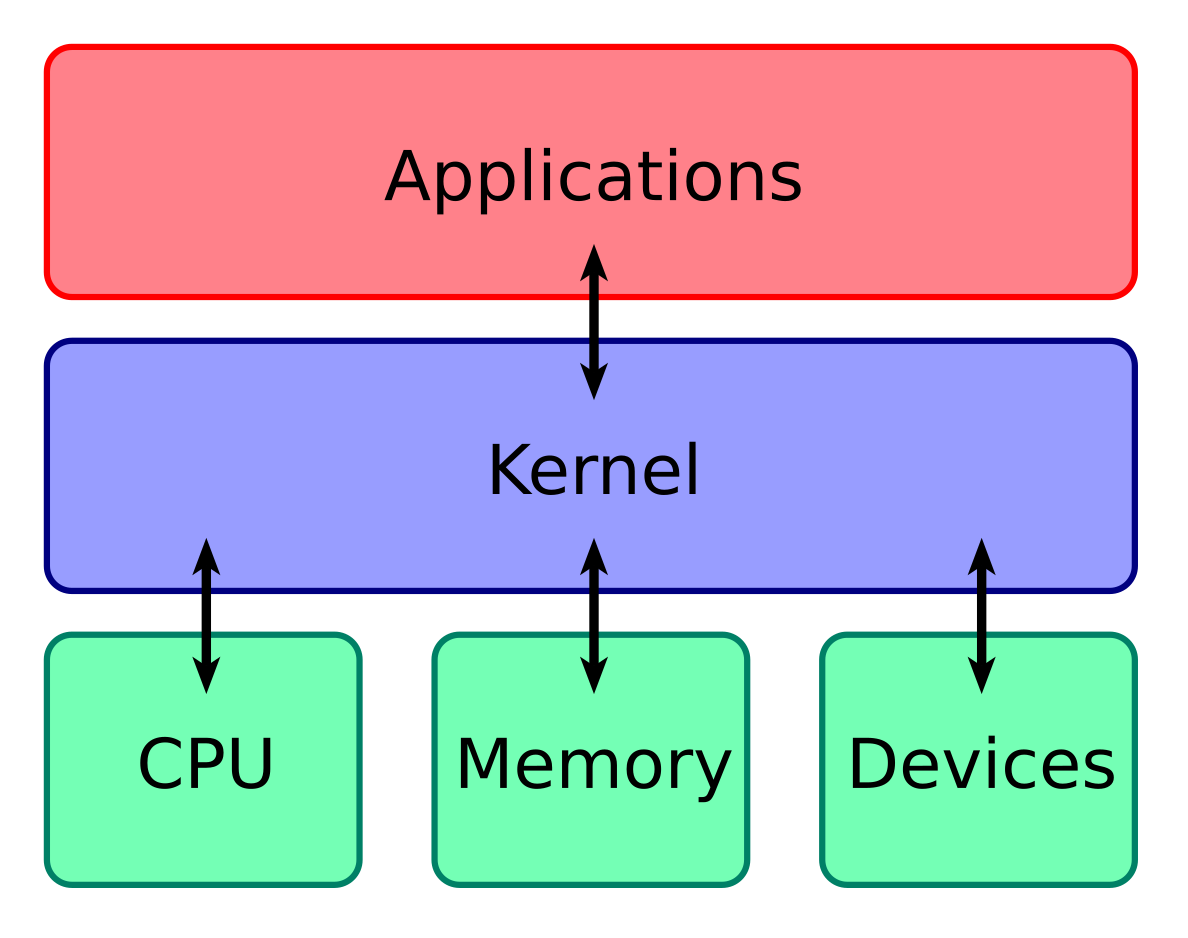
The kernel virtualizes hardware
- Abstracts away hardware differences
- Shares hardware resources
- Protects hardware from users
Don’t want users to arbitrarily read/write memory, hardware, etc., even if you’re the only user (don’t want a programming bug to disrupt entire system).
Kernel-/user-space boundary
(Diagram)
- User-space application reads a file
- Kernel-space function implement file abstraction
- Hardware stores file contents
Diagram:
- User-space calls read
- Read implemented in the kernel
- Kernel interprets read to communicate with hardware
Kernel provides library of functions to manage kernel abstractions.
User applications call kernel to interface to hardware and maintain abstractions on its behalf.
For example, calling open is a kernel library function which handles paths, the file abstraction, and interfacing with storage hardware
This is the case for so-called monolithic kernels, where kernel abstractions are largely managed in kernel space.
In the early 90s, Professor Andrew S. Tanenbaum and Linux developer Linux Torvalds debated over which kernel architecture was better: a monolothic architecture, or a microkernel one. The debate became very intense and sophisticated, but thankfully neither of the two gentlemen held ill-will towards each other afterward. You can read more about it here.
Kernel interface: syscalls
- System calls (syscalls)
- Functions that operate on kernel abstractions
- Processes, memory, files, etc.
Implementation: protected mode
- LPI Figure 3-1
- Software interrupt (trap) to enter kernel space
How do we enforce kernel protections?
Learn more about kernel design at https://pages.cs.wisc.edu/~remzi/OSTEP/intro.pdf
System Calls (syscalls)
Making syscalls
- Just like a C function
- The C library handles
- Setting up parameters
- Triggering interrupt
- Collecting return values and error states
You can even add your own syscall to Linux!
What syscalls are available?
man syscallsman page sections
man man- Section 2: system calls
- Section 3: library calls
Analogy: - Going to the supermarket yourself - Interface directly with the supermarket - Using a delivery app - Interface with a service that then interfaces with the supermarket
C library calls
man 3 fopen
man 3 fprintf
man 3 fscanf
Operates on FILE data structures, a C library abstraction. Adds additional features, like buffering, formatting, etc.
Diagram showing the difference w.r.t. to the kernel boundary. - Back to kernel vs. user - Call fopen, which runs in user-space; then fopen calls the kernel - Instead of user calling kernel directly
syscalls
man 2 open
man 2 write
man 2 read
Operates directly on kernel files, references by file descriptors. Work with raw bytes.
Error handling
The UNIX way
- DIY error handling
- Check syscall return value
- Inspect error state
https://www.dreamsongs.com/RiseOfWorseIsBetter.html
Example: open_simple.c
#include <errno.h>
#include <fcntl.h>
#include <stdio.h>
#include <stdlib.h>

int main(void) {
    const char path[] = "hello.txt";
    int fd = open(path, O_RDONLY);
    if (-1 == fd) {
        perror("open");
        return 1;
    }

    return 0;
}
Check return value for error.
Look at errno for type of error.
Documentation
man 2 openNotable parts of each man page:
- RETURN VALUE
- ERRORS
Error helper: perror()
int fd = open(path, O_RDONLY);
if (-1 == fd) {
  // fprintf(stderr, "open() err: %d\n", errno);
  perror("open")  // perror() interprets errno
  exit(EXIT_FAILURE);
}
Example:
open_complete.c
#include <fcntl.h>
#include <stdio.h>
#include <stdlib.h>
#include <unistd.h>

int main(int argc, char **argv) {
    if (argc < 2) {
        fprintf(stderr, "USAGE: %s file\n", argv[0]);
        exit(1);
    }
    char *path = argv[1];
    int fd = open(path, O_RDONLY);
    if (-1 == fd) {
        perror("open");
        exit(1);
    }

    if (-1 == close(fd)) {
        perror("close");
        exit(1);
    }

    printf("Success\n");
}
strace ./errno missingfile |& egrep "^(open|exit|close|perror)"
strace ./errno files.c |& egrep "^(open|exit|close|perror)"Notice that exit() and perror() are absent
from the strace output, because these are C library calls.
exit() wraps a call to exit_group() and
perror() is a user-space function that interprets the value
of errno. Also note that open() is implemented
by calling the openat() syscall, which is another variant
of open().
File Status
| Symbol | Reference | Reading |
|---|---|---|
stat() |
man 2 stat |
LPI 15.1 |
struct stat |
man 3 stat |
|
st_mode |
man 7 inode |
Use the stat command to see what kind of info is stored
in the stat struct.
Example: file_stats.c
#include <inttypes.h>
#include <stdio.h>
#include <stdlib.h>
#include <sys/stat.h>

int main(int argc, char **argv) {
    char *path;
    struct stat statbuf;

    if (argc < 2) {
        fprintf(stderr, "USAGE: %s path\n", argv[0]);
        exit(EXIT_FAILURE);
    }

    path = argv[1];

    if (-1 == stat(path, &statbuf)) {
        perror("stat");
        exit(EXIT_FAILURE);
    }

    printf("File size: %jd\n", statbuf.st_size);
    printf("Hard links: %jd\n", statbuf.st_nlink);
    switch (statbuf.st_mode & S_IFMT) {
        case S_IFSOCK:  printf("S_IFSOCK\n");   break;
        case S_IFLNK:   printf("S_IFLNK\n");    break;
        case S_IFREG:   printf("S_IFREG\n");    break;
        case S_IFBLK:   printf("S_IFBLK\n");    break;
        case S_IFDIR:   printf("S_IFDIR\n");    break;
        case S_IFCHR:   printf("S_IFCHR\n");    break;
        case S_IFIFO:   printf("S_IFIFO\n");    break;
        default: printf("unknown file type\n");
    }

    return EXIT_SUCCESS;
}
If hard links to directories can’t be created by the user, where are these hard links from?
From the .. (parent) directory and its subdirectories.
Reading Files
| Symbol | Reference | Reading |
|---|---|---|
open() |
man 2 open |
LPI 4.1 |
read() |
man 2 read |
|
close() |
man 2 close |
Example: read_file.c
#include <fcntl.h>
#include <stdio.h>
#include <stdlib.h>
#include <unistd.h>

int main(int argc, char **argv) {
    char *path;
    int fd;
    int i;
    ssize_t bytes_read;
    size_t count = 32;
    char buf[32];

    if (argc < 2) {
        fprintf(stderr, "USAGE: %s file\n", argv[0]);
        exit(EXIT_FAILURE);
    }

    path = argv[1];

    fd = open(path, O_RDONLY);
    if (-1 == fd) {
        perror("open");
        exit(EXIT_FAILURE);
    }

    if (-1 == (bytes_read = read(fd, buf, count))) {
        perror("read");
        exit(EXIT_FAILURE);
    }

    for (i = 0; i < bytes_read; ++i) {
        printf("%c", buf[i]);
    }

    if (-1 == close(fd)) {
        perror("close");
        exit(EXIT_FAILURE);
    }

    return EXIT_SUCCESS;
}
Writing Files
| Symbol | Reference | Reading |
|---|---|---|
open() |
man 2 open |
LPI 4.1 |
read() |
man 2 read |
|
close() |
man 2 close |
Example: write_file.c
#include <fcntl.h>
#include <stdio.h>
#include <stdlib.h>
#include <string.h>
#include <unistd.h>

int main(int argc, char **argv) {
    char *path;
    int fd;
    char buf[] = "Hello, world!\n";
    size_t count = strlen(buf);
    ssize_t bytes_written;
    ssize_t total_bytes_written;

    if (argc < 2) {
        fprintf(stderr, "USAGE: %s file\n", argv[0]);
        exit(EXIT_FAILURE);
    }

    path = argv[1];

    fd = open(path,
              O_WRONLY | O_CREAT | O_TRUNC,
              0644);

    if (-1 == fd) {
        perror("open");
        exit(EXIT_FAILURE);
    }

    bytes_written = write(fd, buf, count);
    if (-1 == bytes_written) {
        perror("write");
        exit(EXIT_FAILURE);
    }

    total_bytes_written = bytes_written;
    while (total_bytes_written < count) {
        total_bytes_written += write(fd,
                buf + total_bytes_written,
                count - total_bytes_written);
    }
    // NOTE: See size_t(3) for how
    // to use size_t with printf().
    printf("Total bytes written %zd\n",
            total_bytes_written);

    if (-1 == close(fd)) {
        perror("close");
        exit(EXIT_FAILURE);
    }

    return EXIT_SUCCESS;
}
Illustrate with figure showing the string as an array and the counters/pointers into that array.
Directory Operations
| Symbol | Reference | Reading |
|---|---|---|
opendir() |
man 3 opendir |
LPI 18.8 |
readdir() |
man 3 readdir |
|
closedir() |
man 3 closedir |
Example: directories.c
#include <dirent.h>
#include <errno.h>
#include <stdio.h>
#include <stdlib.h>
#include <sys/types.h>

int main(int argc, char **argv) {
    char *path;
    DIR *dirp;
    struct dirent *dirent;

    if (argc < 2) {
        fprintf(stderr,
                "USAGE: %s directory\n", argv[0]);
        exit(EXIT_FAILURE);
    }

    path = argv[1];

    dirp = opendir(path);
    if (NULL == dirp) {
        perror("opendir");
        exit(EXIT_FAILURE);
    }

    errno = 0;
    while (dirent = readdir(dirp)) {
        printf("%s\n", dirent->d_name);
    }

    if (0 != errno) {
        perror("readdir");
        exit(EXIT_FAILURE);
    }

    if (-1 == closedir(dirp)) {
        perror("closedir");
        exit(EXIT_FAILURE);
    }

    return EXIT_SUCCESS;
}
This is actually a C library call that uses the underlying
getdents syscall (formerly readdir). See
man 2 getdents.
File links
| Symbol | Reference | Reading |
|---|---|---|
link() |
man 2 link |
LPI 18.3 |
rename() |
man 2 rename |
LPI 18.4 |
Example: link.c
#include <errno.h>
#include <stdio.h>
#include <stdlib.h>
#include <unistd.h>

int main(int argc, char **argv) {
    char *path1;
    char *path2;

    if (argc < 3) {
        fprintf(stderr,
                "USAGE: %s path1 path2\n", argv[0]);
        exit(EXIT_FAILURE);
    }

    path1 = argv[1];
    path2 = argv[2];

    if (-1 == link(path1, path2)) {
        perror("link");
        exit(EXIT_FAILURE);
    }

    return EXIT_SUCCESS;
}
Example: rename.c
#include <errno.h>
#include <stdio.h>
#include <stdlib.h>
#include <unistd.h>

int main(int argc, char **argv) {
    char *path1;
    char *path2;

    if (argc < 3) {
        fprintf(stderr,
                "USAGE: %s path1 path2\n", argv[0]);
        exit(EXIT_FAILURE);
    }

    path1 = argv[1];
    path2 = argv[2];

    if (-1 == rename(path1, path2)) {
        perror("rename");
        exit(EXIT_FAILURE);
    }

    return EXIT_SUCCESS;
}