Pen and Multi-touch Computing
One of the primary research themes in the IS&UE lab is creating new and innovative pen-centric user interfaces and applications. The main focus of our work in pen computing is mathematical sketching, the ability to associate handwritten mathematics and drawings together to create illustrations that assist users in learning and understanding science and mathematical concepts. We are also interested in learning how users are affected by the pen-centric interfaces we develop and whether the educational applications we create are pedagogically effective. In addition, we are exploring how multi-touch interfaces can be used in mathematics and in improving workflow efficiency.
Mathematical Sketching
Diagrams and illustrations are frequently used to help explain mathematical concepts. Students often create them with pencil and paper as an intuitive aid in visualizing relationships among variables, constants, and functions, and use them as a guide in writing the appropriate mathematics to solve the problem. However, such static diagrams generally assist only in the initial formulation of the required mathematics, not in "debugging" or problem analysis. This can be a severe limitation, even for simple problems with a natural mapping to the temporal dimension or problems with complex spatial relationships.
Mathematical sketching is a novel, pen-based, gestural interaction paradigm for mathematics problem solving, designed to overcome these limitations. Mathematical sketching derives from the familiar pencil-and-paper process of drawing supporting diagrams to facilitate the formulation of mathematical expressions; however, with mathematical sketching, users can also leverage their physical intuition by watching their hand-drawn diagrams animate in response to continuous or discrete parameter changes in their written formulas. Diagram animation is driven by implicit associations that are inferred, either automatically or with gestural guidance, from mathematical expressions, diagram labels and drawing elements.
Math Boxes
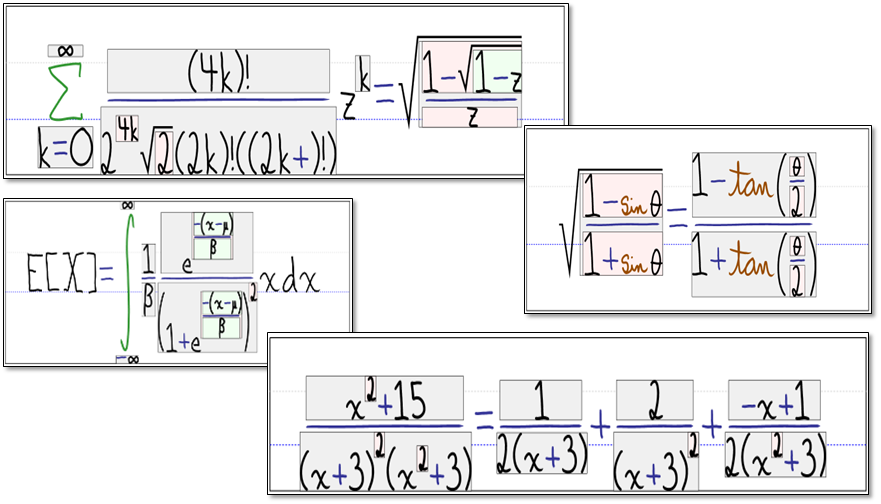
Math Boxes Demonstration
Math Boxes is a novel pen-based user interface for simplifying the task of hand writing difficult mathematical expressions. Visible bounding boxes around certain subexpressions are automatically generated as the system detects specific relationships including superscripts, subscripts, and fractions. Subexpressions contained in a box can then be extended by adding new terms directly into its given bounds. Upon accepting new characters, box boundaries are dynamically resized and neighboring terms are translated to make room for the larger box. Feedback on structural recognition is given via the boxes themselves. We also provide feedback on character recognition by morphing the user's individual characters into a cleaner version stored in our ink database.
Publications
- Taranta, E. and LaViola, J. "Math Boxes: A Pen-Based User Interface for Writing Difficult Mathematical Expressions", Proceedings of the 2015 ACM International Conference on Intelligent User Interfaces (IUI 2015), 87-96, March 2015.
AnalyticalInk
AnalyticalInk is a novel math learning environment prototype that uses a semantic graph as the knowledge representation of algebraic and geometric word problems. The system solves math problems by reasoning upon the semantic graph and automatically generates conceptual and procedural scaffoldings in sequence. We further introduce a step-wise tutoring framework, which can check students’ input steps and provide the adaptive scaffolding feedback. Based on the knowledge representation, AnalyticalInk highlights keywords that allow users to further drag them onto the workspace to gather insight into the problem’s initial conditions. The system simulates a pen-and-paper environment to let users input both in algebraic and geometric workspaces. We conducted an usability evaluation to measure the effectiveness of AnalyticalInk. We found that keyword highlighting and dragging is useful and effective toward math problem solving. Answer checking in the tutoring component is useful. In general, our prototype shows the promise in helping users to understand geometrical concepts and master algebraic procedures under the problem solving.
Publications
- Kang, B., Kulshreshth, A., and LaViola, J. "AnalyticalInk: An Interactive Learning Environment for Math Word Problem Solving", Proceedings of the 21st International Conference on Intelligent User Interfaces (IUI 2016), 419-430, March 2016.
QuickDraw
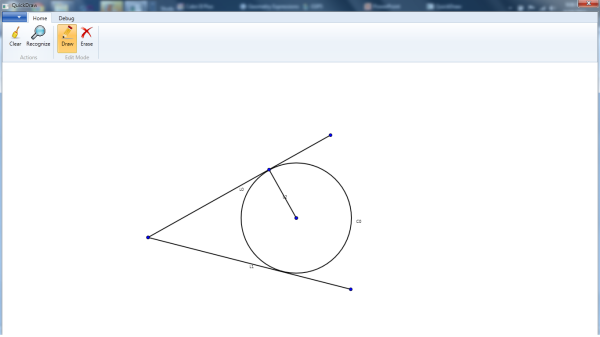
QuickDraw is a prototype sketch-based drawing tool that facilitates drawing of precise geometry diagrams that are often drawn by students and academics in several scientific disciplines. Quickdraw can recognize sketched diagrams containing components such as line segments and circles, infer geometric constraints relating recognized components, and use this information to beautify the sketched diagram. Beautification is based on a novel algorithm that iteratively computes various sub-components of the components using an extensible set of deductive rules.
Publications
- Cheema, S., Buchanan, S., Gulwani, S., and LaViola, J. "A Practical Framework for Constructing Structured Drawings", Proceedings of the 2014 ACM International Conference on Intelligent User Interfaces, 311-316, February 2014.
- Cheema, S., Gulwani, S., and LaViola, J. "QuickDraw: Improving Drawing Experience for Geometric Diagrams", Proceedings of the 2012 ACM Annual Conference on Human Factors in Computing Systems (CHI 2012), 1037-1046, May 2012.
LogicPad
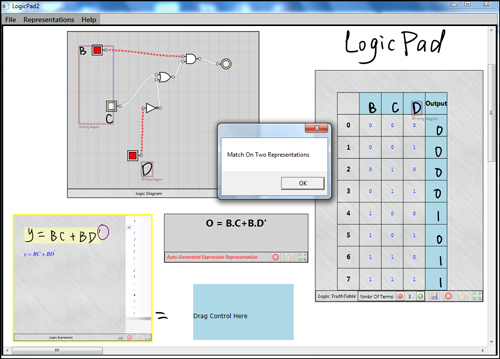
LogicPad is a pen-based application for boolean algebra visualization that lets users manipulate boolean function representations through handwritten symbol and gesture recognition coupled with a drag-and-drop interface. LogicPad's user interface has three three different boolean function representations: boolean expressions, truth tables, and logic gate diagrams, and can verify the equivalence of the different representations.
Publications
- Kang, B. and LaViola, J. "LogicPad: A Pen-Based Application for Visualization and Verification of Boolean Algebra", Proceedings of the 2012 International Conference on Intelligent User Interfaces, 265-268, February 2012.
CSTutor
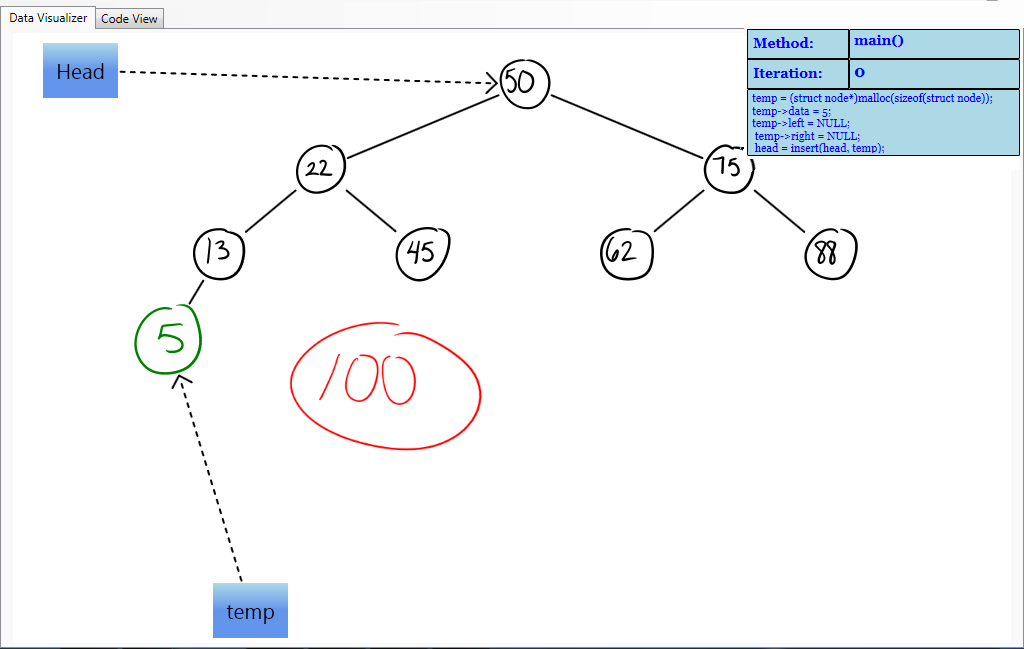
CSTutor Demo
CSTutor is a pen-based application for data structure visualization that lets users manipulate data structures through the recognition of handwritten symbols and gestures as well as edit the corresponding code. The UI consists of a sketching area where the user can draw a data structure in a way that is as natural as pen and paper. Running in parallel with the visualization is a code view where users can make changes to the source code and add functions which manipulate the data structure on the canvas in real time.
Publications
- Buchanan, S. and LaViola, J. "CSTutor: A Sketch-Based Tool for Visualizing Data Structures", ACM Transactions of Computing Education, 14(1):Article 3 (28 pages), March 2014.
- Buchanan, S., Ochs, B., and LaViola, J. "CSTutor: A Pen-Based Tutor for Data Structure Visualization", Proceedings of the 43rd Technical Symposium on Computer Science Education (SIGCSE 2012), 565-570, February 2012.
- Buchanan, S., Ochs, B., and LaViola, J. "CSTutor: A Pen-Based Tool for Visualizing Data Structures", Eighth Eurographics/ACM Symposium on Sketch-Based Interfaces and Modeling 2011, August 2011.
Sketch-based Intelligent Tutoring
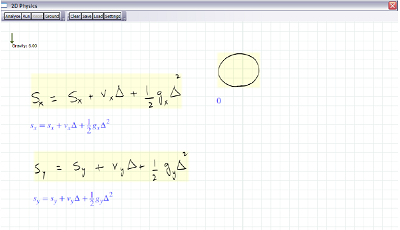
Sketch-based intelligent tutoring is a new approach for creating dynamic illustrations to assist in the understanding of concepts in physics and mathematics using pen-based interaction. This approach builds upon mathematical sketching by combining the ability to make associations between handwritten mathematics and free-form drawings with an underlying physics engine. This combination lets users create animations without having to directly specify object behavior with position functions through time, yet still supports writing the mathematics needed to formulate a problem. This functionality significantly expands the capabilities of mathematical sketching to support a wider variety of dynamic illustrations.
Publications
- Cheema, S. and LaViola, J. "PhysicsBook: A Sketch-Based Interface for Animating Physics Diagrams", Proceedings of the 2012 International Conference on Intelligent User Interfaces, 51-60, February 2012.
- Cheema, S. and LaViola, J. "Applying Mathematical Sketching to Sketch-Based Physics Tutoring Software", Lecture Notes in Computer Science 6133, 10th International Symposium on Smart Graphics (SG 2010), 13-24, June 2010.
- Cheema, S. and LaViola, J. "Towards Intelligent Motion Inferencing in Mathematical Sketching", Proceedings of the 2010 International Conference on Intelligent User Interfaces, 289-292, February 2010.
MathPad2
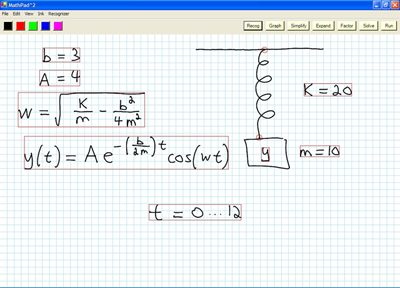
MathPad2 is a pen-based application prototype for creating mathematical sketches. Using a modeless gestural interface, it lets users make dynamic illustrations by associating handwritten mathematics with free-form drawings and provides a set of tools for graphing and evaluating mathematical expressions and solving equations.
Publications
- LaViola, J. and Zeleznik, R. "A Practical Approach to Writer-Dependent Symbol Recognition Using a Writer-Independent Recognizer", IEEE Transactions on Pattern Analysis and Machine Intelligence, 29(11):1917-1926, November 2007.
- LaViola, J. "An Initial Evaluation of MathPad2: A Tool for Creating Dynamic Mathematical Illustrations", Computers and Graphics, 31(4):540-553, August 2007.
- LaViola, J. "Advances in Mathematical Sketching: Moving Toward the Paradigm's Full Potential", IEEE Computer Graphics and Applications, 27(1):38-48, January/February 2007.
- LaViola, J. "An Initial Evaluation of a Pen-Based Tool for Creating Dynamic Mathematical Illustrations", In the Proceedings of the Eurographics Workshop on Sketch-Based Interfaces and Modeling 2006, 157-164, September 2006.
- LaViola, J. "Mathematical Sketching: A New Approach to Creating and Exploring Dynamic Illustrations", Ph.D. Dissertation, Brown University, Department of Computer Science, May 2005.
- LaViola, J. and Zeleznik, R. "MathPad2: A System for the Creation and Exploration of Mathematical Sketches", ACM Transactions on Graphics (Proceedings of SIGGRAPH 2004), 23(3):432-440, August 2004.
Rapid Prototyping Gesture Recognition
Recently, $-family recognizers have become prevalent for sketch recognition, and for good reason. They are easily implemented and accurate. However, there is a trade off between accuracy and execution time. We have explored techniques of minimizing this tradeoff using minimalist recognizers and intelligent prototype selection.
Gesture Path Stochastic Resampling
Gesture Path Stochastic Resampling
Training gesture recognizers with synthetic data generated from real gestures is a well known and powerful technique that can significantly improve recognition accuracy. We introduce a novel technique called gesture path stochastic resampling (GPSR) that is computationally efficient, has minimal coding overhead, and yet despite its simplicity is able to achieve higher accuracy than competitive, state-of-the-art approaches. GPSR generates synthetic samples by lengthening and shortening gesture subpaths within a given sample to produce realistic variations of the input via a process of nonuniform resampling. As such, GPSR is an appropriate rapid prototyping technique where ease of use, understandability, and efficiency are key. A demonstration of this technique is available here.
Publications
- Taranta, E., Maghoumi, M., Pittman, C., and LaViola, J. "A Rapid Prototyping Approach to Synthetic Data Generation for Improved 2D Gesture Recognition", Proceedings of the 29th Annual Symposium on User Interface Software and Technology (UIST '16). 873-885, October 2016.
Penny Pincher

The $-family of recognizers ($1, Protractor $N, $P, 1¢, and variants) are an easy to understand, easy to implement, accurate set of gesture recognizers designed for non-experts and rapid prototyping. Penny Pincher achieves high accuracy by being able to process a large number of templates in a short amount of time. If, for example, a recognition task is given a 50µs budget to complete its work, a fast recognizer that can process more templates within this constraint can potentially outperform its rival recognizers. Penny Pincher achieves this goal by reducing the template matching process to merely addition and multiplication, by avoiding translation, scaling, and rotation; and by avoiding calls to expensive geometric functions. Despite Penny Pincher’s deceptive simplicity, our recognizer, with a limited number of templates, still performs remarkably well.
Publications
- Taranta, E., Vargas, A., and LaViola, J. "Streamlined and Accurate Gesture Recognition with Penny Pincher", Computers and Graphics, Volume 55, 130-142, April 2016.
- Taranta, E. and LaViola, J. "Penny Pincher: A Blazing Fast, Highly Accurate $-Family Recognizer", Proceedings of Graphics Interface 2015, 195-202, June 2015.
Prototype Selection
We explore the benefits of intelligent prototype selection for $-family recognizers. Currently, the state of the art is to randomly select a subset of prototypes from a dataset without any processing. This results in reduced computation time for the recognizer, but also increases error rates. We propose applying optimization algorithms, specifically random mutation hill climb and a genetic algorithm, to search for reduced sets of prototypes that minimize recognition error. After a large scale evaluation, we found that error rates could be reduced compared to random selection and rapidly approached the baseline accuracies for a number of different $-family recognizers. Penny Pincher, in particular, responded well to prototype selection.
Publications
- Pittman, C., Taranta, E., and LaViola, J. "A $-Family Friendly Approach to Prototype Selection", Proceedings of the 21st International Conference on Intelligent User Interfaces (IUI 2016), 370-374, March 2016.
Understanding User Performance with Pen and Touch-Based Interfaces
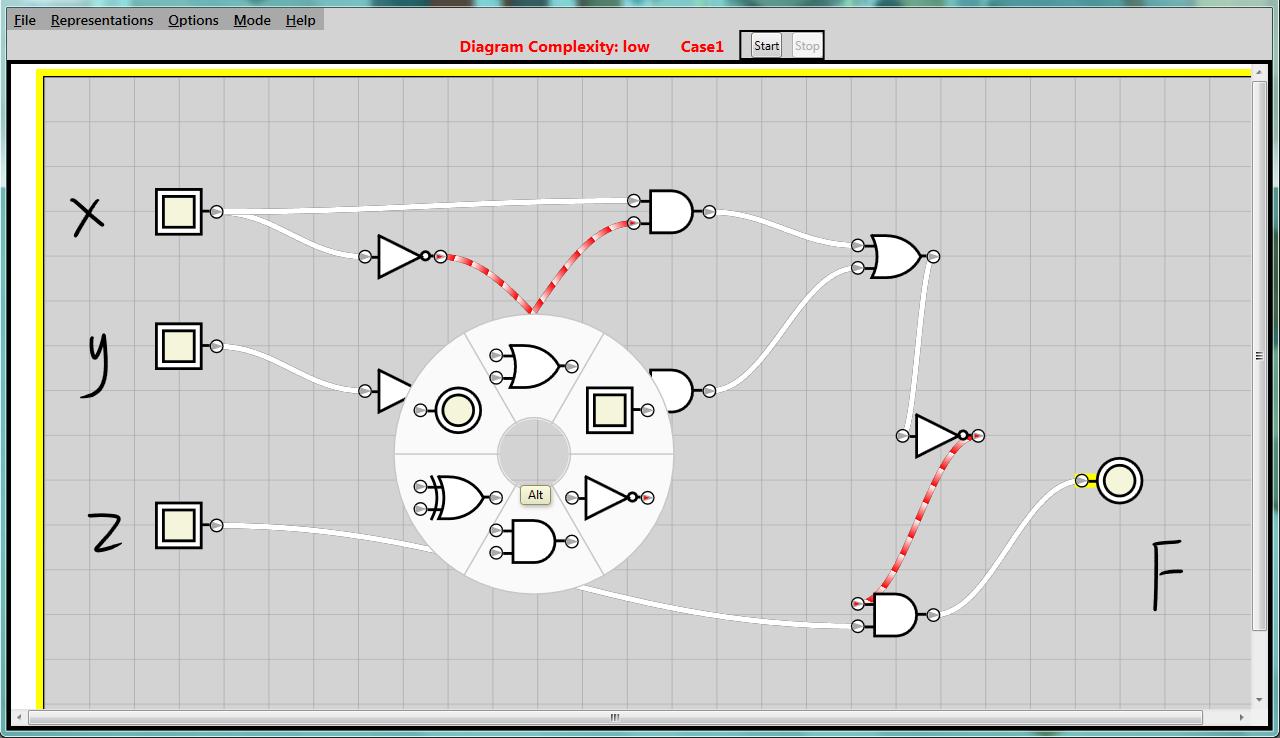
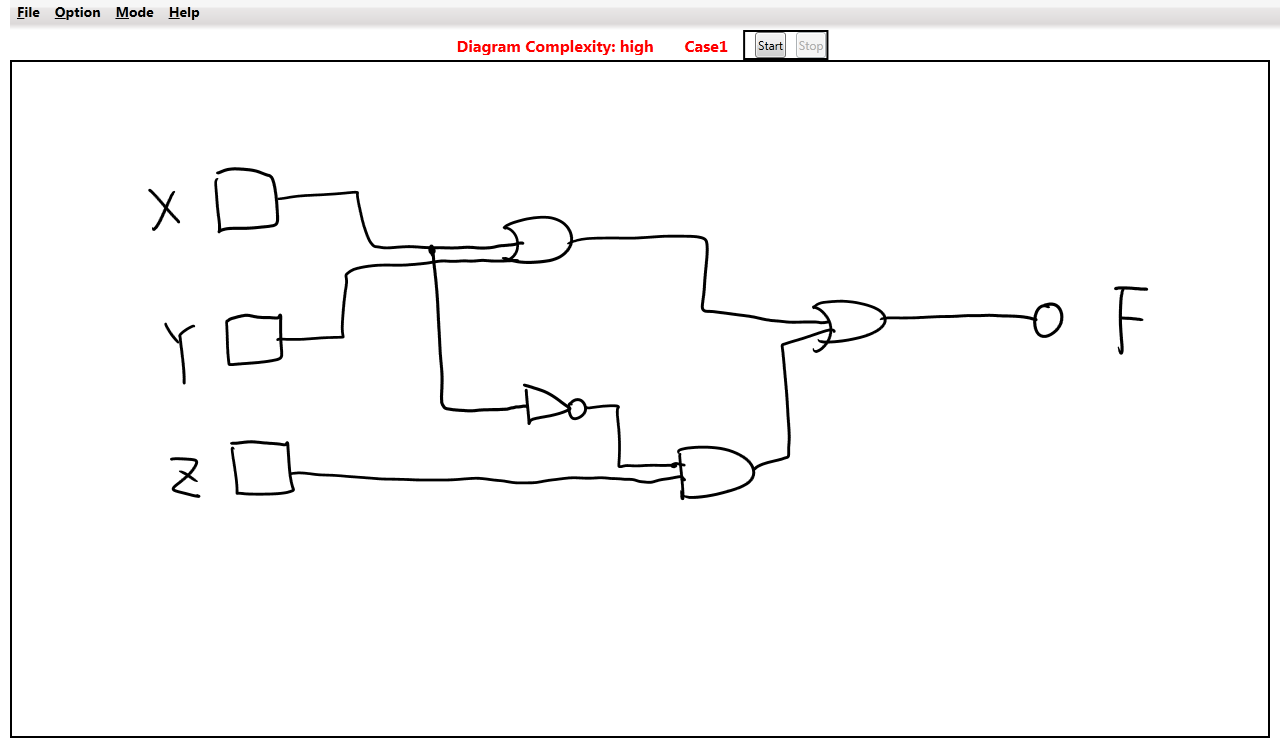
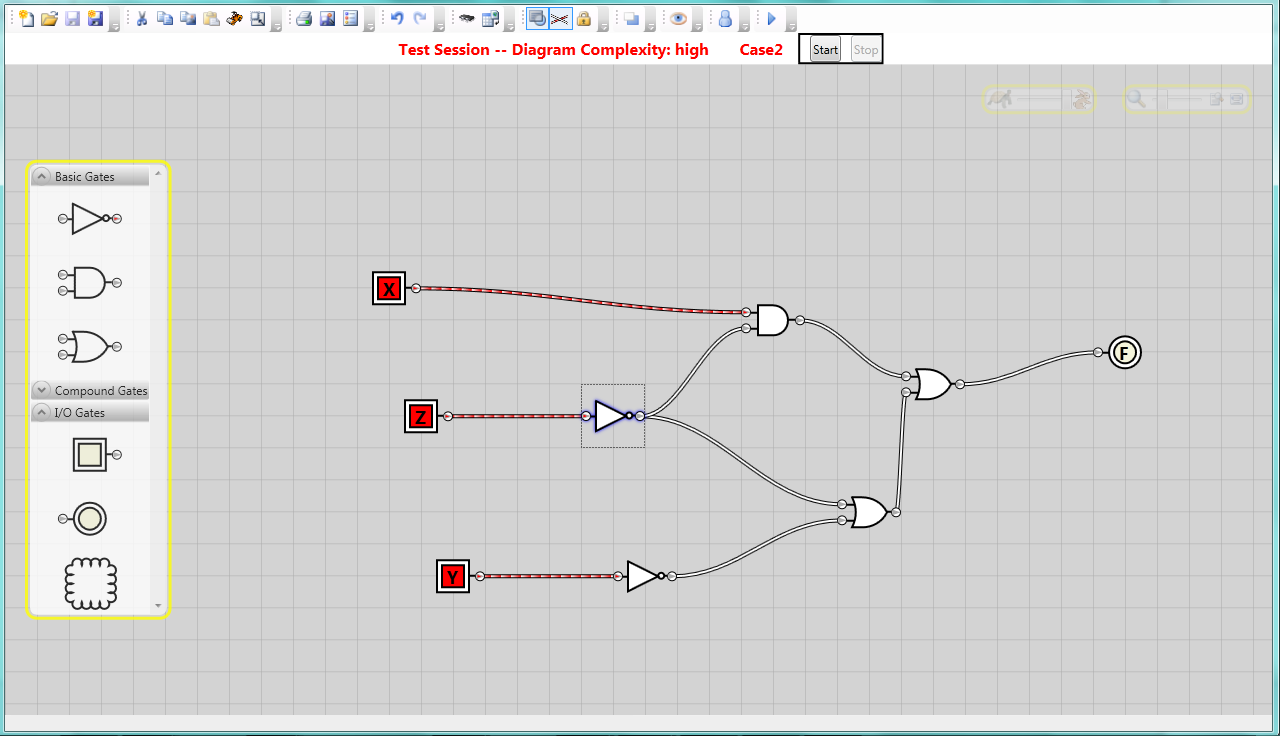
The pen-and-paper interface metaphor that pen-based computers provide make pen-based interfaces both natural and expressive. However, these interfaces can also be difficult to use without proper feedback and guidance in understanding how to perform the various gestures and pen-based commands for a particular application. This project focuses on understanding we can develop tools to assist users when working with pen-based UIs.
Understanding User Perceptions of Diagram Recognition Systems
Researchers hypothesize pen-based interfaces are the input method of choice for structured 2D languages, as they are natural for users. In our research, we seek to understand how users feel about these interfaces and whether they are indeed ideal for structured 2D languages.
Publications
- Kang, B., Bott, J., and LaViola, J. "User Perceptions of Drawing Logic Diagrams with Pen-Centric User Interfaces", Proceedings of Graphics Interface 2013, 79-86, May 2013.
Understanding User Perceptions of Mathematics Recognition Systems
Mathematical handwriting recognition is an important method of mathematics input for computers. While strides in recognition have been made in recent years, recognition is still at a level where mistakes are common and often inexplicable from the user's point-of-view. As a result, recognition mistakes can cause user distraction and frustration. We examine how user preference for real-time or batch recognition mode is affected by recognition accuracy and the number of expressions entered. Our results show that users prefer real-time recognition when working with multiple expressions; however, with high accuracy recognition, users did not prefer one recognition mode over the other.
Publications
- Bott, J., Gabriele, D., and LaViola, J. "Now or Later: An Initial Exploration into User Perception of Mathematical Expression Recognition Feedback", Proceedings of the Eighth Eurographics/ACM Symposium on Sketch-Based Interfaces and Modeling 2011, 125-132, August 2011.
Multi-touch Computing
The focus of this project is to explore multi-touch input. We are currently investigating how this input modality can be used for interacting with 3D objects on a 2D display, and how it can be combined with pen-input for entering and manipulating handwritten mathematical expressions.
Multi-Touch Gestures for 3D Objects
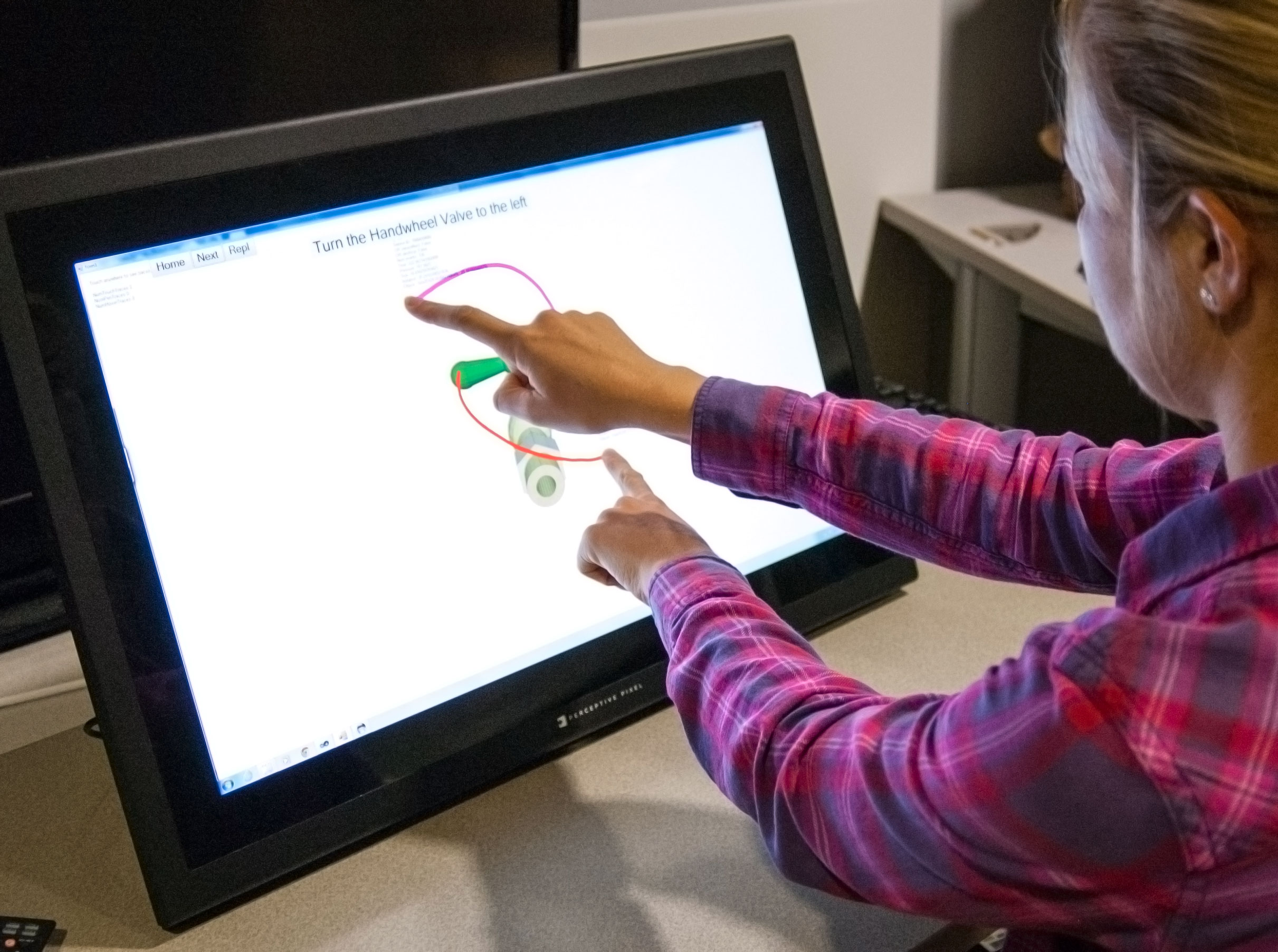
Although multi-touch interaction in 2D has become widespread on mobile devices, intuitive ways to interact with 3D objects has not been thoroughly explored. We present a study on natural and guided multi-touch interaction with 3D objects on a 2D multi-touch display. Specifically, we focus on interactions with 3D objects that have either rotational, tightening, or switching components on mechanisms that might be found in mechanical operation or training simulations.
Publications
- Buchanan, S., Floyd, B., Holderness, W., and LaViola, J. "Towards User-Defined Multi-Touch Gestures for 3D Objects", Proceedings of the 2013 ACM International Conference on Interactive Tabletops and Surfaces (ITS 2013), 231-240, October 2013.
SetPad
SetPad
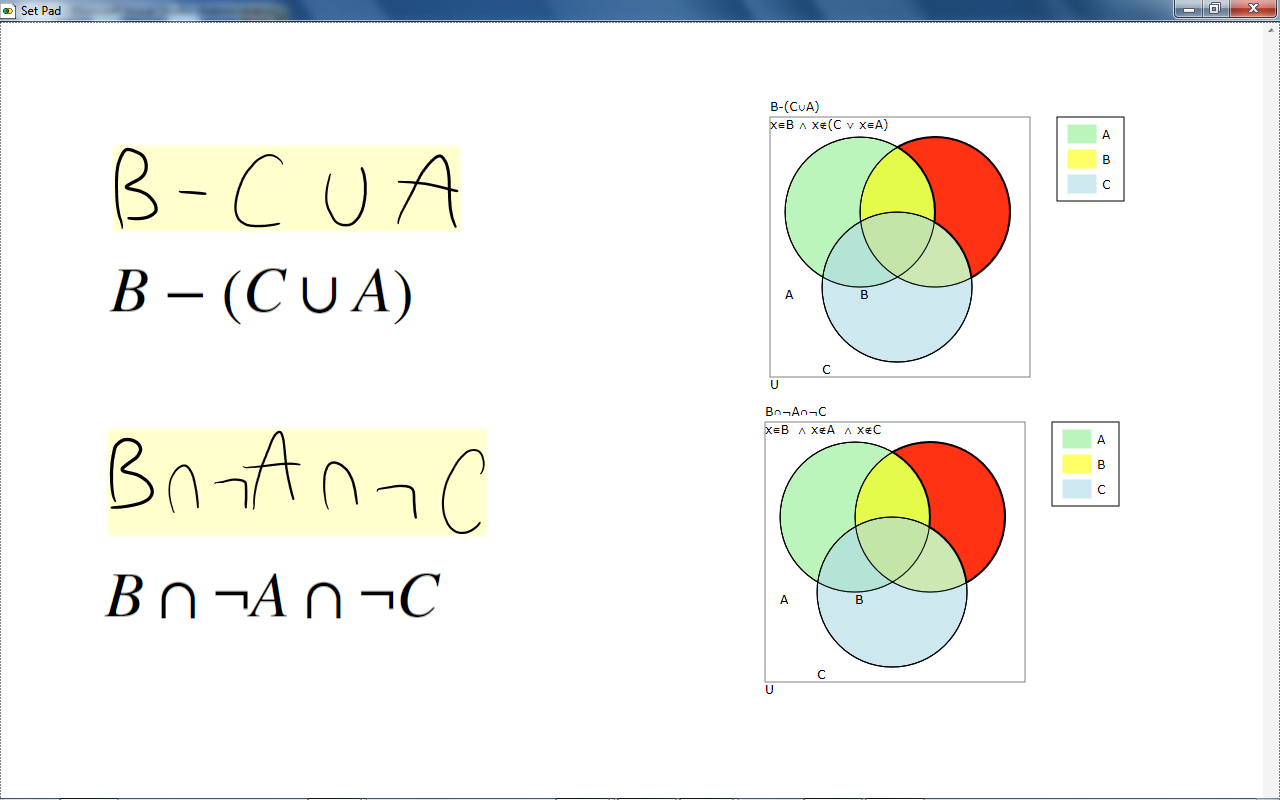
SetPad is a new application prototype that lets computer science students explore discrete math problems by sketching set expressions using pen-based input. Students can manipulate the expressions interactively with the tool via pen or multi-touch interface. Likewise, discrete mathematics instructors can use SetPad to display and work through set problems via a projector to better demonstrate the solutions to the students. We discuss the implementation and feature set of the application, as well as results from a formal user study measuring the effectiveness of the tool for students solving set proof problems. The results indicate that SetPad allows for efficient solutions to proof problems, and has the potential to have a positive impact when used as an individual student application or as an instructional tool.
Publications
- Cossairt, T. and LaViola, J. "SetPad: A Sketch-Based Tool For Exploring Discrete Math Set Problems", Proceedings of the Ninth Eurographics/ACM Symposium on Sketch-Based Interfaces and Modeling 2012, 47-56, June 2012.
- Cossairt, T. and LaViola, J. "SetPad: A Sketch-Based Tool For Exploring Discrete Math Set Problems", Proceedings of the Ninth Eurographics/ACM Symposium on Sketch-Based Interfaces and Modeling 2012, 47-56, June 2012.